Managing educational finances requires tracking diverse revenue streams and complex departmental expenditures across the academic calendar.
This School Budget Planner provides administrators, principals, and department heads with a clean, pre-structured framework to project income, monitor operational expenses, and maintain balanced financial records.
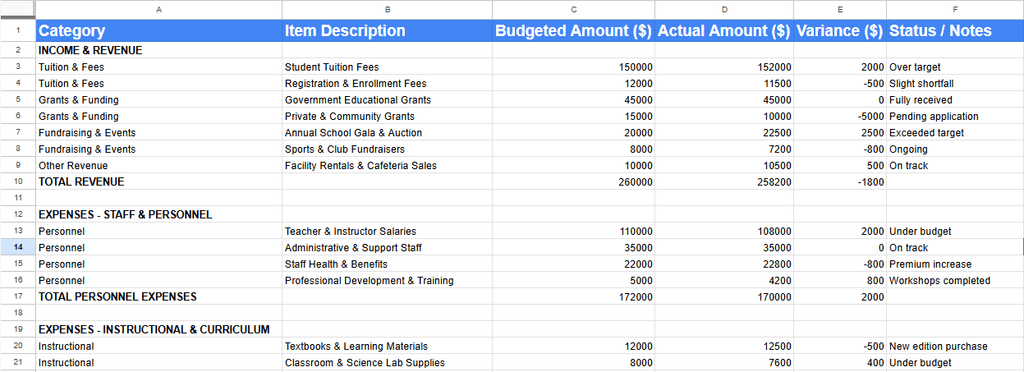
Key Budget Categories for School Budget Planner
- Income & Revenue: Track student tuition, registration fees, government grants, private funding, fundraising events, and facility rentals.
- Personnel & Staffing: Monitor teacher and administrative salaries, employee health benefits, and professional development training.
- Instructional Resources: Allocate funds for textbooks, classroom supplies, science lab equipment, and library subscriptions.
- Technology & IT: Plan hardware upgrades, educational software licenses, and high-speed network maintenance.
- Facilities & Administration: Track building repairs, utilities, cleaning supplies, office printing, and compliance insurance.
- Student Activities & Athletics: Manage expenses for sports equipment, field trips, transportation, and student clubs.
- Financial Summary: View auto-calculated totals comparing total revenue against total expenses to track net surplus or deficit.
How to Use the Planner
- Input Target Projections: Enter estimated revenue and departmental limits into the Budgeted Amount column at the start of the fiscal term.
- Record Actual Figures: Update the Actual Amount column regularly as tuition is collected and invoices are paid.
- Analyze Variances: Review the automatically generated Variance column to spot overages early and adjust allocations as needed.
Frequently Asked Questions
Q: Can this budget planner be adapted for private or charter schools?
Yes. All line items, categories, and rows can be edited, added, or removed to fit public, private, charter, or higher education institutional needs.
Q: How are financial variances calculated in the sheet?
Variances calculate automatically by measuring actual financial data against budgeted estimates, helping flag budget overruns or shortfalls instantly.
Q: Is this template compatible with Microsoft Excel and Google Sheets?
Yes. It works directly in Google Sheets and can be exported as an .xlsx file for Microsoft Excel without breaking built-in formulas.
Important Resources
Microsoft To Do vs Planner: Which Task Management Tool Is Better?
Sample Event Planner Contract Template